Github.io 설정
Jekyll을 사용하여 Github.io 설정을 하겠다
Jekyll을 사용하여 GitHub Pages 사이트 만들기 - GitHub Docs
Jekyll을 사용하여 새 리포지토리 또는 기존 리포지토리에서 GitHub Pages 사이트를 만들 수 있습니다.
docs.github.com
기초 설정
Ruby 설치
먼저 Ruby와 Bundler를 설치한다
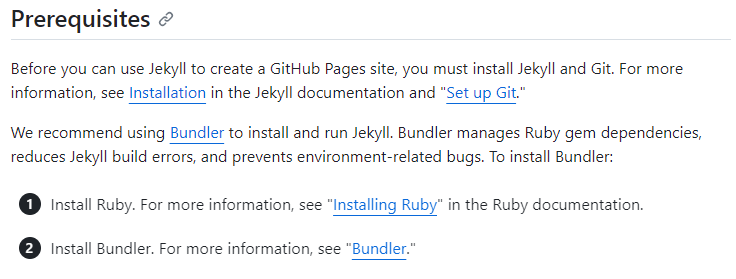
Ruby installation method에서 window를 설치한다
(window10에서 진행중)


Gemfile 다운로드
Bundler를 설치하기 위해 Gemfile을 먼저 다운로드 한다
RubyGems.org | your community gem host
rubygems.org
cmd에서 아래 명령어를 입력하여 업데이트를 진행한다
gem update --system
Bundler 설치
bundler를 설치하기 위해 cmd에서 아래 명령어를 입력한다
https://bundler.io/guides/gemfile.html
Bundler: The best way to manage a Ruby application's gems
In Depth Read the manual for an in-depth discussion of all of the options available in the Gemfile and how to use them. Gemfile manual Gemfiles Gemfiles require at least one gem source, in the form of the URL for a RubyGems server. Generate a Gemfile with
bundler.io
bundler init
Jekyll 설치
jekyll을 설치하기 위해 cmd에서 아래 명령어를 입력한다
https://jekyllrb-ko.github.io/
$ gem install bundler jekyll
Github.io 페이지 생성
아래 페이지에 작성된 순서대로 진행하도록 하겠다
새로운 repository를 생성하고 repository name이 github.io로 끝나도록 설정한다
---
(선택사항) 페이지 생성 시, 위 링크를 template로 사용한다
https://tong9433.github.io/blog/001#/

repository를 로컬에 clone 한다

jekyll 설정
cmd에서 이전에 clone한 경로로 이동하여, 아래의 명령어를 순서대로 입력한다
$ bundle init
$ bundle add jekyll
설치가 완료되면 아래의 명령어로 서버를 시작한다
$ jekyll serve
실행이 성공하면 아래와 같이 출력된다
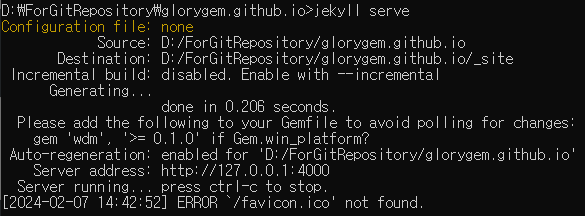

jekyll admin 플러그인 설정
프로젝트 로컬 폴더에 Gemfile을 열어 아래의 코드를 추가한다

gem "jekyll-admin", group: :jekyll_plugins
gem "rackup"
저장 후 아래의 코드를 실행시킨다
$ bundle install
$ jekyll serve
http://localhost:4000/ 로 웹페이지를 볼 수 있으며
http://localhost:4000/admin 로 관리자 페이지를 볼 수 있다
참조
https://dnight.tistory.com/entry/GitHubio-%ED%8E%98%EC%9D%B4%EC%A7%80-%EB%A7%8C%EB%93%A4%EA%B8%B0
GitHub.io 페이지 만들기
Github 를 통해서 홈페이지 또는 블로그 같은 웹페이지를 표시하고 사용 할 수 있습니다. https://pages.github.com/ GitHub Pages Websites for you and your projects, hosted directly from your GitHub repository. Just edit, push, and
dnight.tistory.com
Jekyll을 사용하여 GitHub 블로그 만들기
https://jekyllrb-ko.github.io/ Jekyll • Simple, blog-aware, static sites Transform your plain text into static websites and blogs jekyllrb.com [github.io 페이지 만들기] https://dnight.tistory.com/entry/GitHubio-%ED%8E%98%EC%9D%B4%EC%A7%80-%EB%A7%8C
dnight.tistory.com
https://stackoverflow.com/questions/77917512/whats-the-problem-with-ruby-jekyll-and-rack-handler
What's the Problem with ruby, jekyll, and rack/handler
I'am forked github project sujaykundo777 and wishing to customizing my blog for that, I downloaded Ruby to make blog with 127.0.0.1 but It's too many error to making blog To resolve the error, I de...
stackoverflow.com
'서버' 카테고리의 다른 글
| [가비아] 가비아 클라우드 ssh 접속 (0) | 2025.08.20 |
|---|---|
| [가비아] 가비아 클라우드 기본 설정 (0) | 2025.08.19 |
| [AWS] aws 시작하기 (2) | 2024.05.28 |
| [Node.js] 기본 설정 (0) | 2024.05.28 |
| Github 블로그 간단하게 생성하기 (0) | 2024.03.02 |


